Launcher
Stuck on Updating
For a launcher stuck on Updating, follow the matching Support FAQ error first. Missing .NET 6 Desktop Runtime, disabled auto-update, blocked files and launcher permissions are separate cases. An Updating message alone does not prove a server outage.
The troubleshooting steps below have a single official-wiki source. The historical Reddit updater and outage links returned HTTP 403 on 28 October 2026, so their precise timing and outcomes were not reverified. This page does not diagnose the live realm or provide an unverified log path.
Order that matches the FAQ
Do these before you download a launcher from anywhere except the official download page.
- Install the .NET 6 Desktop Runtime if Play does nothing at all.
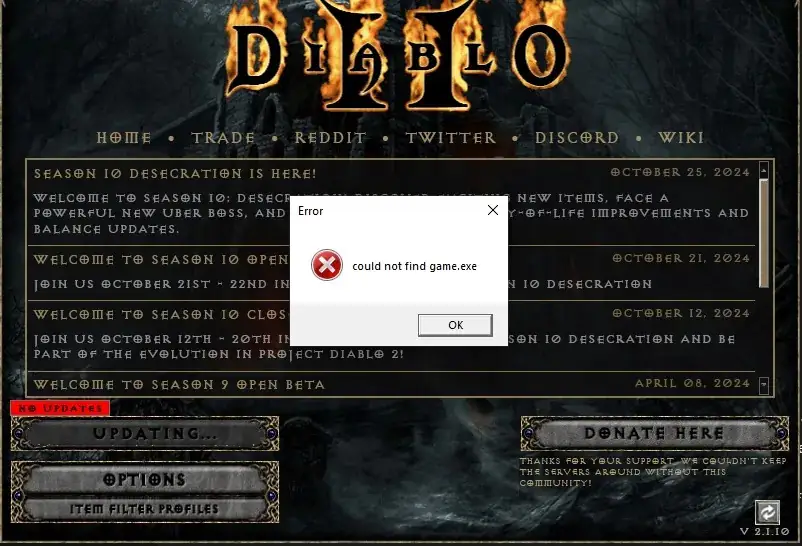
- If the error is Could not find game.exe, auto-update was off before the first Play. Turn it on and press Play again. If the game used to launch, check whether antivirus quarantined a file.
- Run the launcher as administrator.
- Confirm you have the launcher from the official download page, and that a firewall or ad blocker is not cutting it off.
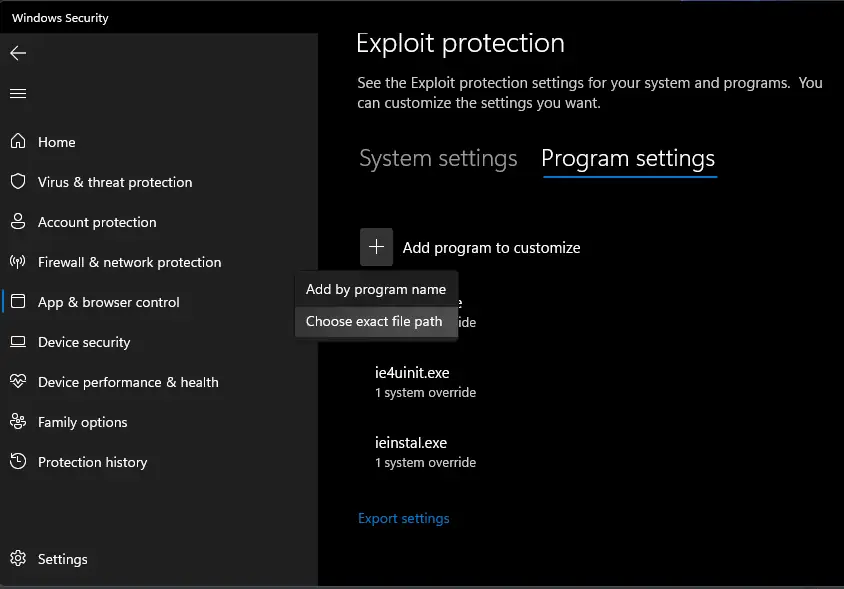
- Exclude the Diablo II folder in the antivirus product. Do not turn the whole product off.
- If it still fails, uninstall and install the current launcher from the official page only.
Launch day
Check the team’s Discord announcements for maintenance before reinstalling. Updating and login errors can have different causes; the inaccessible historical outage thread cannot establish that they share one cause. The login page explains how to tell a ban message from a downed realm.
Watch
Scyushi 2025 setup guide for the classic client and the PD2 launcher. Upload date (YouTube metadata, single source): 2025-07-17. Project Diablo 2 (PD2) Setup Guide (2025) on YouTube. The player loads only after you press play.
Questions
Failed to download the update utility?
The FAQ treats failed launcher downloads as a block: antivirus, firewall, or an old launcher file. Get a new copy from the official download page. There is no log-file path on the FAQ to quote.
I reinstalled and it still says wrong version.
Confirm the official launcher, its permissions and the FAQ checks above. A historical single-thread outcome does not establish the cause of your error. If announcements say a patch is in progress, wait for that instead of stacking installers.
Related
Sources
Checked: 2026-10-28. Single-source claims are attributed; disagreements stay visible.
- Wiki Support FAQ — 2026-10-28 — Fetched 2026-10-28. Single official-wiki source for specific troubleshooting steps unless another source is explicitly identified. Steps were not tested in the client.
- Reddit stuck on updating — 2026-10-28 — HTTP 403 on 2026-10-28. Historical single-thread research citation only; post text, timestamps and replies were not reverified.
- Reddit server down thread — 2026-10-28 — HTTP 403 on 2026-10-28. Historical single-thread research citation only; post text, timestamps and replies were not reverified.
- Official download page — 2026-10-28 — Fetched 2026-10-28. One official source family with the FAQ and rules. No launcher version or file size stated; D2R exclusion is explicit in the FAQ.