Download and setup
How to install Project Diablo 2
There is no web client. You install classic Diablo II, then Lord of Destruction in English, then the PD2 launcher from the official download page into that same folder. Resurrected cannot host the mod. PlayStation 5 is not a platform the download page offers.
The six steps below follow the official download page, with extra requirements from the Support FAQ. Both are one official source family rather than independent verification. The FAQ explicitly excludes Resurrected. Linked videos are optional demonstrations; no game-client installation was performed in this audit.
In this topic
The six official steps
The download page, checked 28 October 2026, is short. This is the order it gives. Do not skip the English language check. The FAQ says enUS is the expected install and enGB is the fallback if enUS will not run.
- Install legitimate English Diablo II and Lord of Destruction from Blizzard.
- Download the Project Diablo 2 launcher from the official download page.
- Run the downloaded PD2 installer from your Downloads folder.
- Choose your Lord of Destruction destination folder.
- Open the launcher using its desktop icon.
- Create a game account through the official account link, then use it to log in to the game client.
When the launcher stops
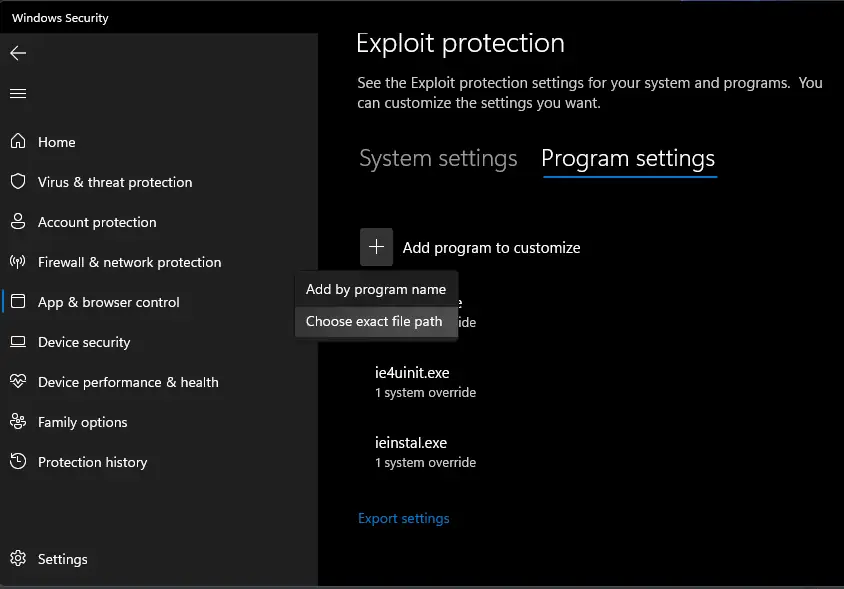
The FAQ suggests a folder outside protected paths, such as C:\Games\Diablo II, the .NET 6 Desktop Runtime, and an antivirus exclusion on the whole Diablo II directory. After that, the launcher’s Play button is what pulls updates.
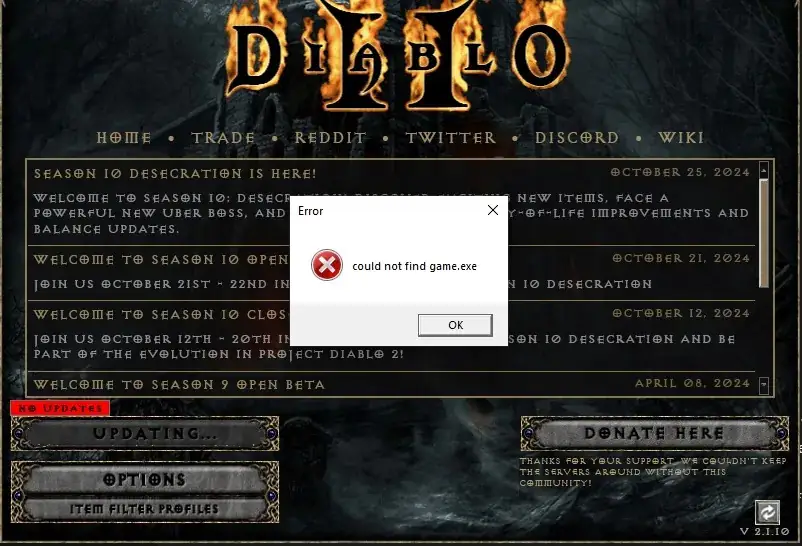
Named failures on the FAQ, not a private error-code table: Failed to load ProjectDiablo.dll, Halt, Unhandled Exception c0000005, a CD-ROM drive error, and Could not find game.exe. If the button sits on Updating, use the updater page instead of reinstalling from a random mirror.
Watch
Sven Nord walks through a legal Diablo II plus Lord of Destruction install and the PD2 launcher. Upload date (YouTube metadata, single source): 2023-12-19. How To Install Project Diablo 2 in 2024 on YouTube. The player loads only after you press play.
Questions
What do I have to buy?
A legitimate classic Diablo II plus Lord of Destruction. The mod itself is free. The FAQ states it is a free mod that requires that legal legacy install, not Resurrected.
Can I install it on Diablo II Resurrected?
No. The Support FAQ explicitly says the mod is not for Resurrected; the download page requires classic D2 and LoD. There is no D2R build of PD2 to wait for on those pages.
Is there a PS5 version?
No. The official installer is for Windows, sitting on top of a PC copy of Diablo II and Lord of Destruction.
Related
Sources
Checked: 2026-10-28. Single-source claims are attributed; disagreements stay visible.
- Official download page — 2026-10-28 — Fetched 2026-10-28. One official source family with the FAQ and rules. No launcher version or file size stated; D2R exclusion is explicit in the FAQ.
- Wiki Support FAQ — 2026-10-28 — Fetched 2026-10-28. Single official-wiki source for specific troubleshooting steps unless another source is explicitly identified. Steps were not tested in the client.
- Official rules — 2026-10-28 — Fetched 2026-10-28. Single official source for realm policy; no independent legal or file-safety assessment.