Install and reload
Loot filters
A loot filter decides which items shout at you. PD2 reads filter files from the game folder. The Item Filtering wiki page names default.filter, loot.filter, and a filters\local path. Numpad 0 reloads the filter without a restart. There is no single official “best” filter. The page lists public ones.
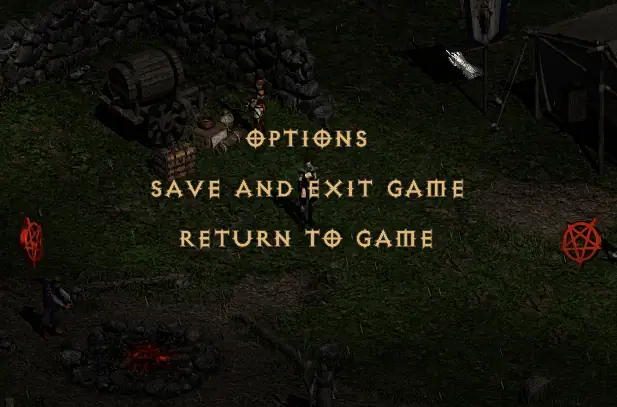
I matched the options screenshot on the wiki to the file names in the article. The failure I kept seeing described is a filter that never loads because the file is in the wrong folder or the name is off by a character. I did not rank community filters. The wiki list is the index, and it can change.
Install
Put the file where the wiki says. Select it in the options menu the screenshot shows. Press Numpad 0. If the ground looks the same, you edited a copy the game is not reading.
- default.filter is the baseline the wiki names.
- loot.filter is the custom file people overwrite.
- filters\local is the local override path on that page.
- Season 13 added syntax such as WIDTH. A filter from an older season can miss new lines. Check Filter Info for the grammar.
Always show items, and colors
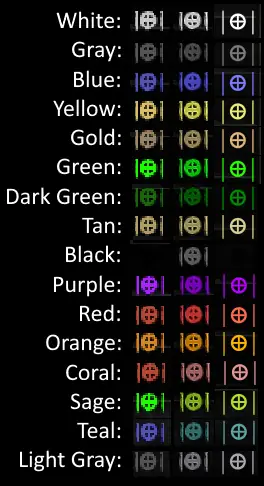
“Always show items on the ground” is a display toggle, not a filter line. If you want every white to appear, that toggle is the FAQ-style answer. Filter colors are documented on the Text Colors chart. Do not pick a color code from a D2R filter and assume the token matches. Filter Info is the syntax page, including map notifications and the errors people hit.
Watch
JuxtAPoser on where maps come from and how to use them. Upload date (YouTube metadata, single source): 2025-05-16. Project Diablo 2 - Mapping 101 on YouTube. The player loads only after you press play.
Questions
Where do I download a filter?
From the public list on the Item Filtering wiki page, or from the author that list links. This site does not rehost filter files.
The filter did nothing. Now what?
Confirm the file name, confirm the folder, press Numpad 0, and read Filter Info for the error that matches the line you added.
Related
Sources
Checked: 2026-10-28. Single-source claims are attributed; disagreements stay visible.
- Wiki Item Filtering — 2026-10-28 — Fetched 2026-10-28. Single official-wiki source family for detailed numeric rules; separate wiki pages are not independent confirmation.
- Wiki Filter Info — 2026-10-28 — Fetched 2026-10-28. Single official-wiki source family for detailed numeric rules; separate wiki pages are not independent confirmation.
- Wiki Patch: Season 13 — 2026-10-28 — Fetched 2026-10-28. Single official-wiki source family for detailed numeric rules; separate wiki pages are not independent confirmation.