SteamOS
Project Diablo 2 on Steam Deck
There are two documented Steam Deck routes: the Support FAQ uses Steam Proton and ProtonTricks, while scambier describes Lutris in Desktop Mode. Both run the Windows game and require your legitimate Diablo II and Lord of Destruction keys. Follow one route consistently so its prefix, launcher and shortcuts stay together.
The FAQ and scambier independently document Deck installation. The FAQ names Proton 9.0-4 (or similar); scambier’s Deck route names wine-ge-8-26-x86_64. His Proton 9.0-4 section is for Linux Mint, not his Deck Lutris steps. These are documented examples, not verified requirements for every current SteamOS release.
Keep optional DLL advice separate
scambier’s optional d2fps.dll section explicitly says it was not authorized on PD2 servers as of 7 August 2026 and prevents online play. The installation guidance here does not recommend adding that DLL to an online client. This restriction has one source: that author’s note.
What to follow
Start with the FAQ so you are on the path the wiki will update. Use scambier when the FAQ assumes you already know Lutris. Use the video when you want the Deck UI. You still install a legal Windows copy of Diablo II and Lord of Destruction inside that setup. The PD2 launcher is the same installer as on Windows.
- FAQ Proton route: Desktop Mode → ProtonTricks → add the Blizzard downloader to Steam → keep D2, LoD and PD2 installer in the same Proton prefix → apply the runtime steps listed in the FAQ.
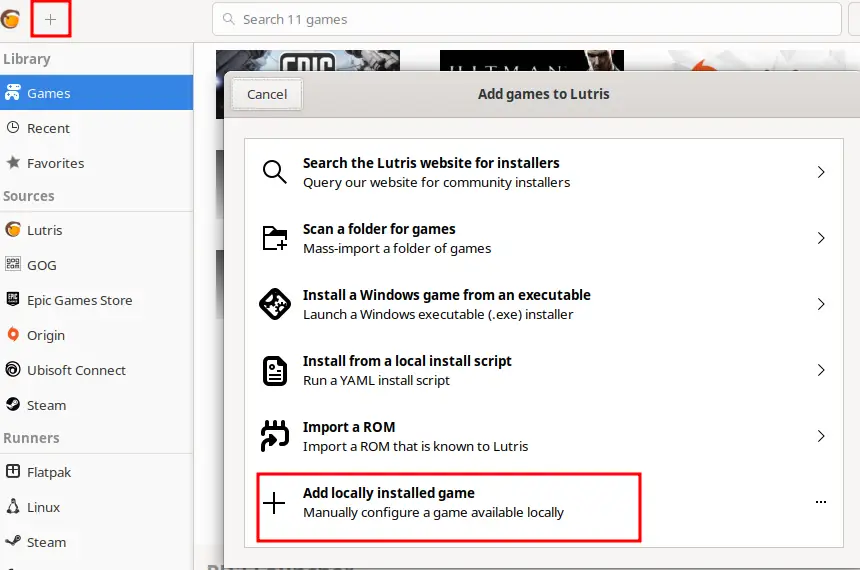
- scambier Deck route: Desktop Mode → Lutris → install PD2 → run once in Lutris → duplicate the entry as SteamPD2 and point it at SteamPD2.exe → add that entry to Steam.
- Travic: the video linked by the FAQ for its Proton route.
- Controls: the in-game controller menu, not a Steam Input guess. See the controller page.
Saves
The Windows FAQ puts saves in the Diablo II install’s Save folder. On Deck, the prefix that contains that folder depends on Lutris or Proton. scambier’s example is /home/deck/Games/project-diablo-2/drive_c/Program Files (x86)/Diablo II/Save. Your prefix can differ; locate your actual Save folder, and back it up before a season reset. Shared stash rules do not change because you are on a handheld.
Watch
Travic step-by-step Steam Deck install. Upload date (YouTube metadata, single source): 2025-05-13. How To Install Project Diablo 2 On Your Steam Deck on YouTube. The player loads only after you press play.
Questions
Is Steam Deck officially documented?
The Support FAQ has a Steam Deck section. That is as official as the wiki gets. It is still the Windows game inside a compatibility layer.
Do I need a controller?
The Deck’s controls are a controller. PD2 has a controller menu. The details are on the controller page, including a Season 14 per-skill aim toggle.
Related
Sources
Checked: 2026-10-28. Single-source claims are attributed; disagreements stay visible.
- Wiki Support FAQ — 2026-10-28 — Fetched 2026-10-28. Single official-wiki source for specific troubleshooting steps unless another source is explicitly identified. Steps were not tested in the client.
- scambier Linux and Steam Deck notes (updated 2026-08-07) — 2026-10-28 — Fetched 2026-10-28. Independent field notes, updated August 7, 2026; Deck Lutris and Linux Mint Steam steps differ. Optional d2fps.dll is explicitly not authorized for online play as of that update.
- Official download page — 2026-10-28 — Fetched 2026-10-28. One official source family with the FAQ and rules. No launcher version or file size stated; D2R exclusion is explicit in the FAQ.